
Open source OpenClaw alternative
Updated October 7, 2026.
Rakazo
- Chat in the Rakazo app
- Docker installer, then chat
- Apache-2.0
OpenClaw
- Gateway for chat apps
- CLI, onboarding, config file
- MIT
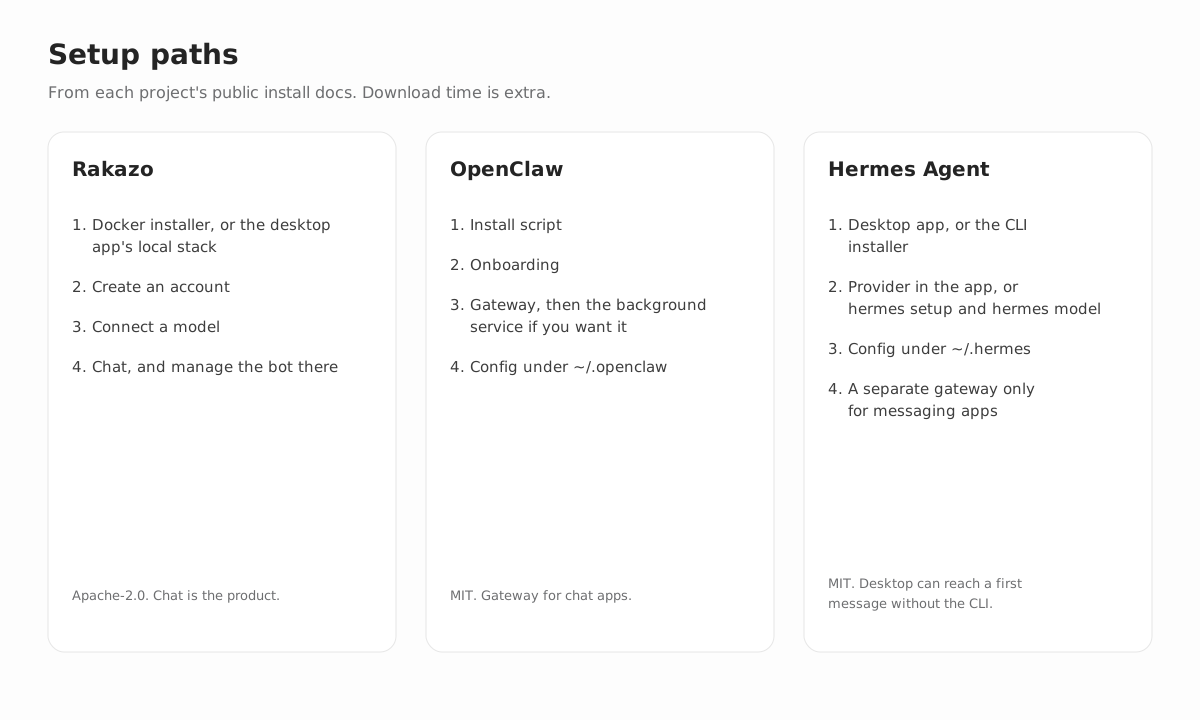
The main difference is simplicity. Like Grok Bot, Rakazo is just chat: you set up the bot and manage it from that chat. OpenClaw is also open source and self-hosted. Its getting-started guide is a longer path: a CLI installer, an onboarding wizard, a Gateway you run in the terminal or install as a background service, and a config file.
They are not the same product, and Rakazo does not import an OpenClaw setup. OpenClaw details below follow OpenClaw's documentation. Rakazo details follow this project. Both change. The linked docs are the place to confirm a detail.
Setup
Rakazo's self-host path is the published Docker installer, or the desktop app starting that stack on this computer. You create an account and connect a model. From there it is just chat, on the web, desktop, and mobile apps. A new bot interviews you about the work, and you manage the bot from that chat. Routines are readable Markdown.
OpenClaw's getting-started guide installs the CLI, then runs a wizard. Quick start is the short path when a Claude Code or Codex login, or an API key, is already on the machine. Custom setup walks through the full flow, and openclaw onboard --classic is the step-by-step wizard. Quick start leaves the Gateway in that terminal until you stop it, so you can chat before installing a service. openclaw gateway install is the later step that keeps it in the background: a LaunchAgent on macOS, a systemd user unit on Linux, or a Scheduled Task on Windows. You check openclaw gateway status (the guide says port 18789) and open openclaw dashboard. Messaging from a phone, such as Telegram, is a separate Channels step.
Day-to-day management
Day to day, you manage Rakazo from the same chat. Schedules, memory, and approval boundaries stay with that bot, on the web, desktop, and mobile apps. Optional connectors can attach Slack, WhatsApp, Telegram, iMessage via Sendblue, and Feishu/Lark. They are not required to use the product.
OpenClaw's docs send later changes through openclaw configure and a JSON config file, ~/.openclaw/openclaw.json unless you override the path. openclaw doctor and openclaw triage diagnose the install. The Gateway is the process you keep running, in a terminal or as the installed background service, and chat apps are the main way you message the assistant, alongside the Control UI.
Comparison
| Topic | Rakazo | OpenClaw |
|---|---|---|
| Setup | Docker installer or the desktop app's local stack, then an account and a model. After that Rakazo is just chat: a new bot interviews you, and you manage it from the chat. | CLI install, then Quick start or Custom setup. The Gateway can stay in that terminal for a first chat. openclaw gateway install is the background service (LaunchAgent, systemd user unit, or Windows Scheduled Task). Then openclaw gateway status and openclaw dashboard. A phone channel is a separate step. |
| Day-to-day management | You manage the bot from the same chat on the web, desktop, and mobile apps. Routines are readable Markdown and can run on a schedule. A bot can pause for approval at a boundary you set. | Later changes go through openclaw configure and ~/.openclaw/openclaw.json. openclaw doctor and openclaw triage diagnose the install. The Gateway stays running in a terminal or as the installed background service. |
| What it is | An open source platform for persistent AI teammates. Bots keep conversations, memory, routines, and history, and can use a browser, shell, and desktop. | A self-hosted gateway that connects chat apps to an AI assistant on your machine. The project describes one Gateway for the channels you already use. |
| License | Apache-2.0. Maintained in the open by Inbox Zero Inc. | MIT. Stewarded by the OpenClaw Foundation, an independent 501(c)(3). |
| Where it runs | You self-host with published Docker images or from source. Web, desktop, and mobile apps are clients of that API. Hosted Rakazo Cloud is not generally available. | You run the Gateway on your own computer or a server. The docs say there is no hosted service in the middle. Interfaces include a browser Control UI, companion apps, and iOS and Android nodes. |
| How you talk to it | The Rakazo web app, Electron desktop app, and Expo mobile app. Optional connectors can attach Slack, WhatsApp, Telegram, iMessage via Sendblue, and Feishu/Lark. | Chat apps are the primary surface. Documented channels include Discord, Google Chat, iMessage, Matrix, Microsoft Teams, Signal, Slack, Telegram, WhatsApp, Zalo, and others via plugins, plus WebChat. |
| Models | Bring your own keys for OpenAI, Anthropic, Google, OpenRouter, or Vercel AI Gateway. OpenAI-compatible endpoints and a local model server (Ollama, LM Studio, llama.cpp, or MLX) are supported. Each bot can use a different model. | Many providers, including Anthropic, OpenAI, and Google, plus OAuth for some subscriptions such as OpenAI Codex. Self-hosted endpoints include vLLM, SGLang, Ollama, llama.cpp, LM Studio, and other OpenAI-compatible or Anthropic-compatible servers, with failover. |
| Computers and tools | Browser, terminal, files, and a graphical desktop. The default computer is local Docker. Optional remote computers are E2B, Daytona, CreateOS, and Box. An explicit desktop provider can run on the host; it is not the default. | Tools include browser automation and exec. Sandboxing is off by default. When enabled, documented backends include Docker, Podman, SSH, OpenShell, and Crabbox. The Gateway process stays on the host. |
| Routines and memory | Routines are saved as readable Markdown. Memory, schedules, an audit log, and approval boundaries are part of the product. | Sessions, memory, skills, cron, hooks, and plugins. Direct chats can share a main session. Group chats are isolated by default. |
| Integrations | Optional Composio or Pipedream catalogs, plus MCP servers, Treg, and OpenAPI tools you add. | Channel plugins, skills, a plugin SDK, and web search through several providers. |
| More than one agent | Bots can delegate to peer bots or short-lived subagents. | Multi-agent routing with isolated sessions per agent, workspace, or sender. |
| Software cost | No seat fee for the open source software. You pay the models and infrastructure you use. | The docs say there is no paid tier. You pay the models and the machine you run. |
Key differences
Teammates in an app, or an assistant in your chats
Rakazo is a web, desktop, and mobile app. A bot has a job, a computer, and routines saved as Markdown you can read and edit. OpenClaw is a Gateway you message from the chat apps you already use, with a browser Control UI and mobile nodes around that gateway.
Rakazo can attach optional Slack, WhatsApp, Telegram, iMessage (Sendblue), and Feishu/Lark connectors. Those are extras. Chat apps are OpenClaw's main surface, including Discord, Signal, iMessage, Slack, Telegram, WhatsApp, and other channel plugins.
Where the computer runs
Rakazo runs browser and shell work on a computer. Local Docker is the default. E2B, Daytona, CreateOS, and Box are optional remote computers. An explicit desktop provider can run on the host, and it is not the default.
OpenClaw can sandbox tool execution. Its docs say sandboxing is off by default, and that the Gateway process stays on the host. Documented sandbox backends include Docker, Podman, SSH, OpenShell, and Crabbox.
Models and what you pay
Both let you bring a model provider, including a server you host. Rakazo connects OpenAI, Anthropic, Google, OpenRouter, Vercel AI Gateway, an OpenAI-compatible endpoint, or a local model server, and each bot can use a different model. OpenClaw documents Anthropic, OpenAI, Google, and others, including self-hosted OpenAI-compatible and Anthropic-compatible endpoints, with failover.
Neither project charges a seat fee for the software. OpenClaw's docs say it has no paid tier and no hosted service. Rakazo is free to self-host. Hosted Rakazo Cloud is not generally available. You pay for the models, machines, and optional computer providers you use.
License
Rakazo is Apache-2.0, maintained by Inbox Zero Inc. OpenClaw is MIT, stewarded by the OpenClaw Foundation, which the project describes as an independent 501(c)(3).
Which shape fits
Rakazo
Repeated browser and shell work, scheduled operational routines, an audit log, and approval boundaries, with the same bots on the web, desktop, and mobile clients. Self-host it from the guide.
OpenClaw
An assistant that lives in chat apps you already use, with channel plugins, skills, and a gateway on your machine. Start from the OpenClaw docs.
Sources
- OpenClaw docs
- OpenClaw getting started
- OpenClaw features
- OpenClaw sandboxing
- OpenClaw source
- Rakazo self-host guide
- Rakazo source
FAQ
Is Rakazo simpler to set up than OpenClaw?
The documented paths are different. Rakazo's self-host guide is a Docker installer, or the desktop app starting that stack, then an account and a model. After that Rakazo is just chat, and you manage the bot from that chat. OpenClaw's getting-started guide is an installer and a wizard (Quick start or Custom setup). You can chat while the Gateway runs in that terminal. openclaw gateway install keeps it running in the background, then openclaw gateway status and openclaw dashboard. Connecting a chat app is another step. OpenClaw can be short when a model login is already detected. The ongoing surface is still the Gateway and the config file.
Can I chat with OpenClaw before installing a background service?
Yes. Quick start leaves the Gateway in that terminal until you stop it, so you can send a message before openclaw gateway install. That command is the later step that keeps the Gateway in the background: a LaunchAgent on macOS, a systemd user unit on Linux, or a Scheduled Task on Windows. Rakazo does not add a gateway service. After Docker or the desktop app, the product is the chat.
Do I manage OpenClaw from the chat?
You message the assistant from chat apps or the Control UI. The docs send later changes through openclaw configure and ~/.openclaw/openclaw.json. openclaw doctor and openclaw gateway status are separate commands. Rakazo keeps schedules, memory, and approval boundaries in the same chat, the way Grok Bot does.
Is Rakazo just chat, like Grok Bot?
After the install, yes. You set up the bot and manage it from that chat on the web, desktop, and mobile apps. OpenClaw is also a conversation, and its docs add a Gateway you keep running and a config file for later changes. The two are not interchangeable. Rakazo does not import an OpenClaw setup.
Is Rakazo a drop-in replacement for OpenClaw?
No. Rakazo does not import OpenClaw configuration, skills, or channel sessions. It is a separate open source agent you self-host.
How do the licenses differ?
Rakazo is released under the Apache-2.0 license. OpenClaw is released under the MIT license and is stewarded by the OpenClaw Foundation, an independent 501(c)(3).
Do both keep data on my machine?
Yes for the software you run. OpenClaw's documentation says state, memory, and credentials live on your hardware, and that there is no hosted service in the middle. A Rakazo deployment stores its database and bot data on your host. In both cases, prompts go to the model provider you configure, and to any chat service you connect.
Can I choose my own model with either one?
Yes. Rakazo supports OpenAI, Anthropic, Google, OpenRouter, Vercel AI Gateway, an OpenAI-compatible endpoint, and a local model server, with a choice per bot. OpenClaw documents Anthropic, OpenAI, Google, and other providers, including self-hosted OpenAI-compatible and Anthropic-compatible endpoints, plus failover.
Does either project charge for the software?
Rakazo is free to self-host. Hosted Rakazo Cloud is not generally available. OpenClaw's documentation says the project has no paid tier and no hosted service. You still pay for models, machines, and any optional computer providers you use.
Related
- Rakazo home
- Self-hosted AI agent guide
- Grok Bot alternative
- Meta Muse
- OpenAI Dots
- Instinct AI
- Hark Pro
- Hermes Agent
- All comparisons
Get started
Self-host Rakazo on your machine, or leave an email for hosted Rakazo Cloud.