
OpenClaw vs Hermes Agent vs Rakazo: which is simplest to run?
Comparison
| Topic | Rakazo | OpenClaw | Hermes Agent |
|---|---|---|---|
| License | Apache-2.0 | MIT, OpenClaw Foundation | MIT, Nous Research |
| First surface | Web, desktop, and mobile chat | Gateway for chat apps | Desktop app, or a CLI |
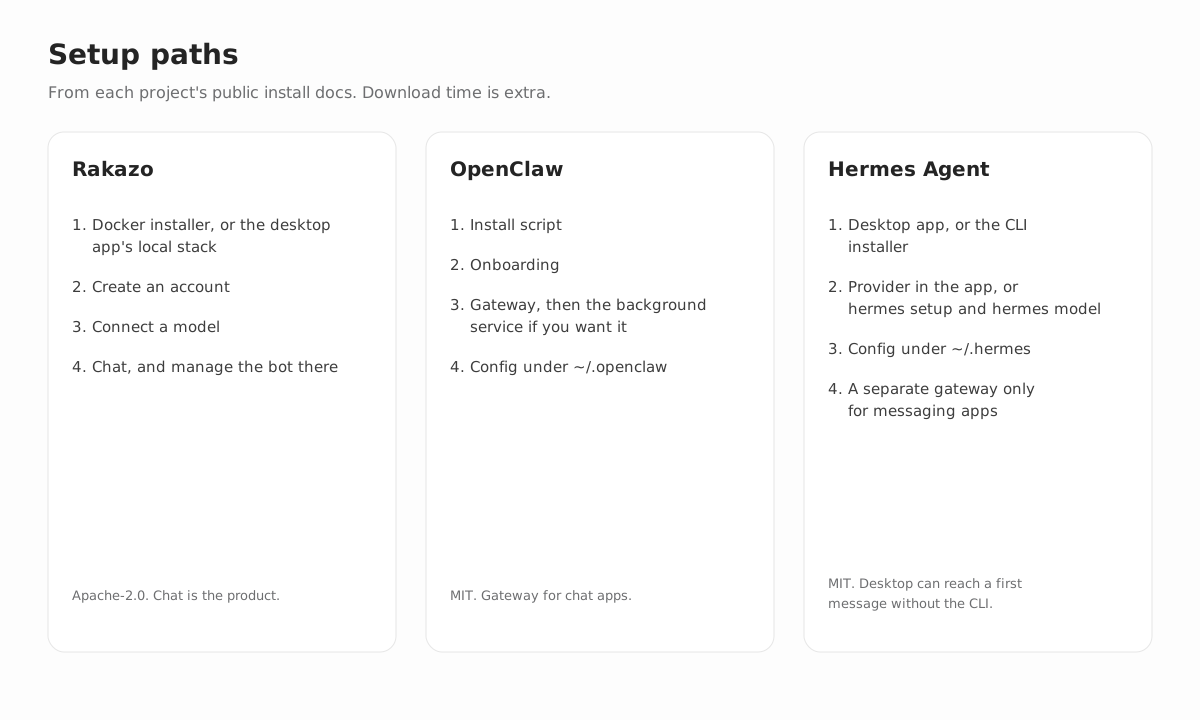
| Install | Docker installer, account, model | Install script, onboarding, gateway | Desktop app, or install.sh and hermes setup |
| Config you edit later | The chat, and readable routine Markdown | ~/.openclaw and openclaw configure | ~/.hermes/.env and config.yaml, or desktop settings |
| Sandbox default | Docker computer by default | Docs say sandboxing is off by default | A local backend in the desktop app |
People ask which of these is simplest. The honest answer is that they are not three installers for the same product. Rakazo is a chat application for persistent bots. OpenClaw is a gateway that connects chat apps to an assistant on your machine. Hermes Agent is a desktop app and a command-line agent that share a config directory, with a messaging gateway you start when you want Telegram, Discord, Slack, and the rest.
All three can run on hardware you control. All three send prompts to the model provider you configure. None of this page is a timed benchmark. The steps below are the ones each project documents.
What simplest means here
A short command is not the same as a simple week. The useful question is where you will manage the agent after the first reply.
If you want a bot with a name, a computer, and routines you can read, and you want that bot in a web, desktop, and mobile app, Rakazo is the smaller ongoing surface. The install is Docker, then chat.
If you already live in Discord, Telegram, WhatsApp, Slack, Signal, or iMessage and you want one process on your machine to sit behind those apps, OpenClaw’s Gateway is the thing the project is built around. The cost of that shape is onboarding, a background service, and a config file.
If you want a native desktop agent, Hermes Desktop is documented as a first-run path that does not require the CLI. The CLI remains the path the quickstart teaches, and messaging platforms are another process. Calling Hermes “more steps” than Rakazo ignores the desktop guide. Calling Rakazo “more steps” than Hermes ignores Docker and the account. Match the install to the surface.
Rakazo
Rakazo is Apache-2.0. You run the published Docker images, or a source checkout, on a machine you control. The desktop app can start that stack locally or connect to a server you already run. Hosted Rakazo Cloud is not generally available.
The published-image installer is one script in an empty directory. It writes .env with random secrets, pulls the images, and starts the API, the worker, Postgres, and a Docker computer. You open the app, create an account, and connect a model. The first registered user is the deployment owner. From there the product is chat. A new bot interviews you. Routines are Markdown. A bot can pause for approval, and actions land in an audit log you keep.
Models include OpenAI, Anthropic, Google, OpenRouter, Vercel AI Gateway, an OpenAI-compatible endpoint, and a local server such as Ollama, LM Studio, llama.cpp, or MLX. Each bot can use a different model. The default computer is local Docker. E2B, Daytona, CreateOS, and Box are optional. An explicit desktop provider can run on the host, and it is not the default.
Optional connectors exist for Slack, WhatsApp, Telegram, iMessage via Sendblue, and Feishu/Lark. They are not how you talk to the bot. The web, Electron, and Expo apps are.
There is no seat fee for the software. You pay for models, machines, and any remote computer you enable. Image pull time is not a fixed number. The self-host guide is the command list, and the longer install note says what the ten-minute title does and does not mean.
OpenClaw
OpenClaw is MIT and stewarded by the OpenClaw Foundation, which the project describes as an independent 501(c)(3). The docs say you run the Gateway on your own computer or a server, and that there is no hosted service in the middle and no paid tier for the software.
The install page, read on October 7, 2026, says Node 26 is recommended, and that Node 24.16+ or Node 26.1+ are the supported releases. The installer script detects the OS, can install Node, installs OpenClaw, and launches onboarding:
curl -fsSL https://openclaw.ai/install.sh | bashThe Gateway can stay in that terminal for a first chat. openclaw gateway install is the background service, as a LaunchAgent, a systemd user unit, or a Windows Scheduled Task. Later changes go through openclaw configure and ~/.openclaw/openclaw.json. openclaw doctor and openclaw dashboard are part of living with that install. A phone channel is a separate step.
Chat apps are the primary surface. Documented channels include Discord, Google Chat, iMessage, Matrix, Microsoft Teams, Signal, Slack, Telegram, WhatsApp, Zalo, and others via plugins, plus WebChat. Interfaces also include a browser Control UI and iOS and Android nodes.
Tools include browser automation and exec. The sandboxing docs say sandboxing is off by default, and that the Gateway process stays on the host. When you turn sandboxing on, documented backends include Docker, Podman, SSH, OpenShell, and Crabbox. That default matters if you expected a container the way Rakazo’s computer is a container unless you change it.
Models include Anthropic, OpenAI, and Google, plus OAuth for some subscriptions such as OpenAI Codex. Self-hosted endpoints include vLLM, SGLang, Ollama, llama.cpp, LM Studio, and other OpenAI-compatible or Anthropic-compatible servers, with failover. Sessions, memory, skills, cron, hooks, and plugins are part of the project. Direct chats can share a main session. Group chats are isolated by default.
You pay for the models and the machine. The project docs say the software has no paid tier.
Hermes Agent
Hermes Agent is Nous Research’s open source agent, under the MIT license, at github.com/NousResearch/hermes-agent. The project site also offers optional Nous Portal credits and cloud hosting. Those are optional. The software can run on your machine.
The desktop guide describes a native app on macOS, Windows, and Linux. It shares config, API keys, sessions, skills, and memory with the CLI, under ~/.hermes/. The same guide says first-run onboarding gets you to a first message in seconds, and that Choose provider later skips provider setup. Settings cover providers, models, tools, credentials, MCP servers, the gateway, and sessions. The app starts its own local hermes serve backend. That chat does not require the CLI or the web dashboard.
The CLI is a different path, and it is the one the quickstart spends its time on. Linux, macOS, and WSL2 use an install.sh script. Windows uses a PowerShell script. Then hermes setup offers Quick Setup with Nous Portal, Full Setup, or Blank Slate, and hermes model picks a provider. Secrets go in ~/.hermes/.env. Other settings go in ~/.hermes/config.yaml. The first terminal chat is hermes or hermes --tui.
The quickstart lists many providers, including Nous Portal, OpenAI, Anthropic, OpenRouter, Google, a custom OpenAI-compatible endpoint, and local servers such as Ollama and LM Studio. It says a model needs at least 64,000 tokens of context. That is a Hermes requirement, not a Rakazo one.
Telegram, Discord, Slack, WhatsApp, Signal, Email, and Teams use hermes gateway setup and a gateway process you start separately. The desktop guide says that messaging gateway is a different process from the app’s local backend. If you only want the desktop chat, you do not have to run it. If you want the bot in those apps, you do.
Day to day, desktop settings cover the providers and sessions. The CLI recovery commands documented in the quickstart are hermes doctor, hermes model, hermes setup, and hermes gateway status. Tool access is hermes tools. Cron, skills, and MCP servers are further configuration.
Nous Research describes a self-improving agent that creates skills from experience, keeps memory across sessions, and can run scheduled jobs. This page does not repeat broader claims than that. Read their docs for the behavior they actually ship.
How to choose
Choose Rakazo when the work is a teammate in an app you open: repeated browser and shell jobs, scheduled routines you can read, an approval when the action matters, and the same bot on the web, desktop, and phone. The install cost is Docker and an account. The ongoing cost is chat, not a config file for every change.
Choose OpenClaw when the assistant should show up in chat apps you already use, and you are willing to run a Gateway, install it as a service, and edit ~/.openclaw when something drifts. Sandboxing is something you turn on. The docs say it is off by default.
Choose Hermes Desktop when you want a native app and a first message without learning the CLI. Choose the Hermes CLI when you want the terminal, hermes model, and files under ~/.hermes. Add the messaging gateway only when you want those platforms. Do not treat the desktop path and the gateway path as one step count.
A few cases are easy to get wrong. If you need a library that compiles into your own Python service, none of these three is that library. LangGraph and CrewAI are in the wider roundup for that reason. If you need a hosted assistant with no install, look at the other pages on the alternatives hub. Those products are a different trade.
What this page does not measure
It does not measure tokens per dollar, browser reliability, or how often a scheduled job succeeds. It does not say one project is safer in every configuration. OpenClaw with sandboxing on is a different risk from OpenClaw with sandboxing off. Rakazo’s Docker computer is a different risk from pointing a bot at a remote VM. Hermes with a local model is a different risk from Hermes with a hosted provider.
It also does not say the projects stay still. Node versions, installer flags, and desktop onboarding change. The source list is the set of pages this comparison was checked against on October 7, 2026. If a command here disagrees with the upstream page, the upstream page wins.
FAQ
Is Rakazo always fewer steps than Hermes Desktop?
No. The Hermes desktop guide says first-run onboarding can reach a first message in seconds, and that Choose provider later skips provider setup. Rakazo's published images still need Docker to pull and start, then an account and a model. Pick the install that matches the app you want to live in.
Do any of these charge for the software?
Rakazo is free to self-host. Hosted Rakazo Cloud is not generally available. OpenClaw's docs say there is no paid tier and no hosted service. Hermes Agent is MIT-licensed and also documents optional Nous Portal credits and cloud hosting. You still pay for models, machines, and any optional computer provider.
Can I message all three from Telegram or Slack?
OpenClaw's main surface is chat apps, through its Gateway. Hermes uses a messaging gateway that the desktop guide describes as a separate process from the app's local backend. Rakazo's optional connectors can attach Slack, WhatsApp, Telegram, iMessage via Sendblue, and Feishu/Lark. Those connectors are extras. The Rakazo apps do not require them.
Where do the details on this page come from?
OpenClaw details follow docs.openclaw.ai as read on October 7, 2026. Hermes details follow the Hermes Agent site, quickstart, and desktop guide. Rakazo details follow this project's self-hosting guide. Check those pages before you rely on a command.
Sources
- OpenClaw install docs
- OpenClaw sandboxing
- Hermes Agent quickstart
- Hermes Agent desktop
- Rakazo self-hosting guide