
How to self-host an AI agent in 10 minutes
Comparison
| Path | What you do | What it is not |
|---|---|---|
| Published images | One installer in an empty directory, then an account and a model. | A measured ten-minute promise. Image pulls vary. |
| This computer | The desktop app can start the same published images locally. | A substitute for reading the secrets checklist on a public server. |
| Public server | Prepare the env, set the HTTPS origin, and proxy loopback 5173. | Publishing port 3100. The web server proxies /api. |
| Source checkout | Clone, env, Postgres, and the dev commands when you are changing Rakazo. | Required for running the published images. |
The title is the shape of the local install, not a stopwatch result. Rakazo’s published images start from one script. Docker then downloads the images, and that download is the part that varies. When the app is up, you create an account, connect a model, and the first chat is the product. A hostname on the public internet, TLS, and a review of secrets are a separate piece of work.
This page follows the self-hosting guide and the self-hosted AI agent page. Those stay the reference if a command changes.
What you are running
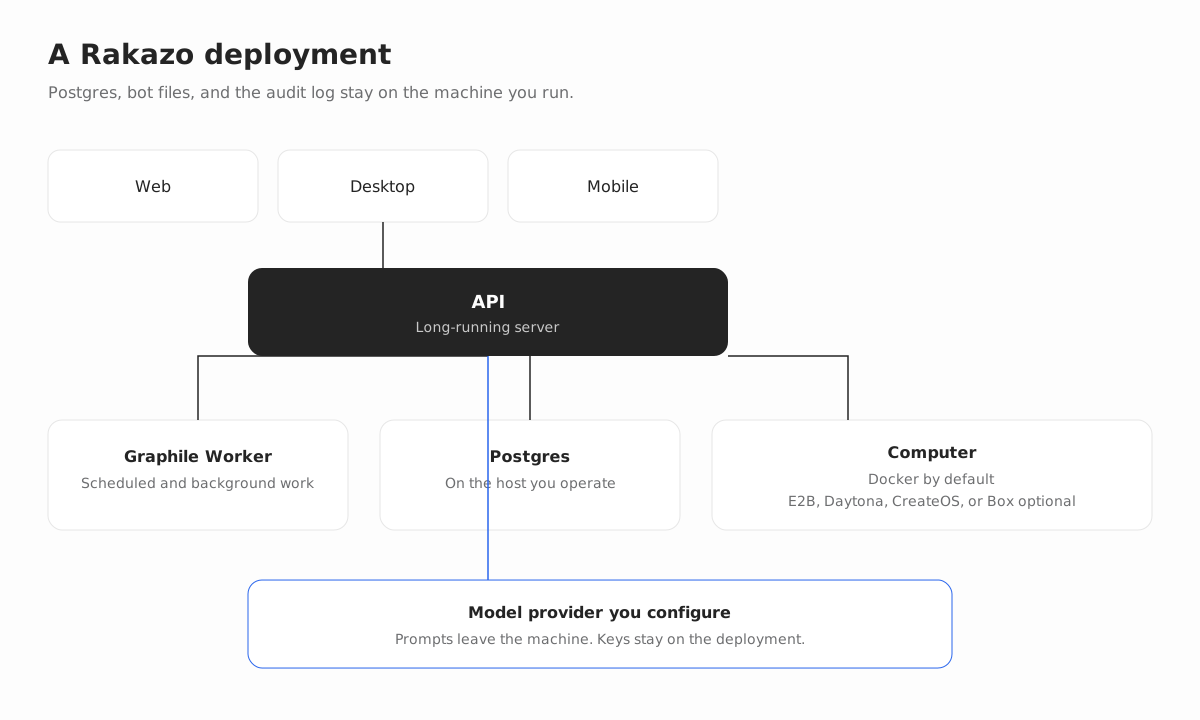
A signed-in Rakazo deployment is not a static site. The guide describes a long-running API, a Graphile Worker, Postgres, and a computer provider. The computer defaults to Docker. E2B, Daytona, CreateOS, and Box are optional remote computers, each with its own API key. The web app, the Electron desktop app, and the Expo mobile app are clients of that API.
Postgres, bot files, browser profiles, and the audit log stay on the machine you operate. Content you send to a model provider is processed by that provider under its terms. You choose the provider and the keys. There is no seat fee for the open source software. You pay the model provider and any remote computer you turn on.
The software is Apache-2.0. Hosted Rakazo Cloud is not generally available, so this install is how you run it today.
What the machine needs
For published images, the guide asks for Docker Engine 26 or newer, because bot home volumes use API 1.45 subpaths. You also need the Compose plugin, curl, and OpenSSL. You do not install Node.js for this path.
A source checkout is different. It wants Node.js 22.22.2 or newer on the 22.x line, Node.js 24.x, or Node.js 26 or newer, plus pnpm 9 and Docker. Node.js 23.x and 25.x are not supported. Use that path when you are developing Rakazo. It is not required to run the published images.
Install the published images
From an empty directory on the machine that should run Rakazo:
mkdir -p rakazo && cd rakazo &&
curl -fsSLO https://raw.githubusercontent.com/elie222/rakazo/main/infra/compose/install-images.sh &&
bash install-images.sh
The installer downloads the Compose file and .env.images.example, creates .env with random secrets, and starts Rakazo. Run it again and it keeps an existing .env. The default image tag is edge, which tracks builds from the main branch for linux/amd64 and linux/arm64. Do not assume a latest tag until a stable release exists.
If you want to set the public URL, the image tag, or an optional provider before the first start, run bash install-images.sh --prepare-only, edit .env, then run bash install-images.sh again. The flags --prepare-only and --local can be combined.
SANDBOX_PROVIDER defaults to docker. The images Compose file runs a sandbox supervisor on the internal network and pulls the computer image. Signup and local Docker computers work without an E2B account. The published-images stack requires SANDBOX_SUPERVISOR_TOKEN for every provider. Leave it empty and Compose fails closed rather than starting a supervisor with no token.
Open http://127.0.0.1:5173. The first registered user becomes the deployment owner. Connect a model in the app, or set OPENROUTER_API_KEY before startup. Local Docker computers are on by default.
The image pull is the variable part. A fast link and a warm cache finish sooner than a laptop on a slow network pulling the app, the computer image, and Postgres for the first time. Treat “10 minutes” as a description of how small the installer is, then look at your own pull.
Create a bot
After the account exists, the product is chat. A new bot asks for a name, a title, and a description, and you pick whether it shares the team computer or gets a private one. The form below is the real create-bot screen, filled with demo data. Nothing in the shot is a customer account.
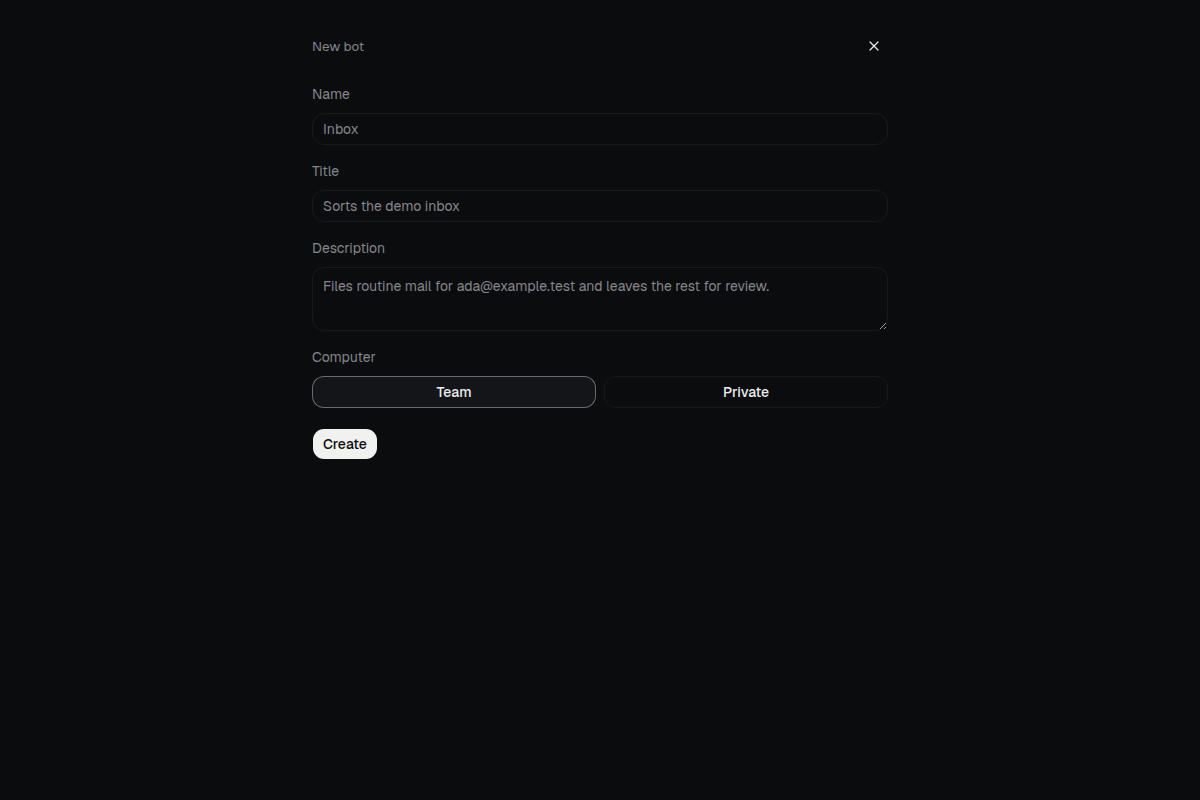
The bot keeps its own conversations, memory, routines, and history. You manage it from the same chat on the web, desktop, and mobile clients.
Choose a model
Supported connections include OpenAI, Anthropic, Google, OpenRouter, and Vercel AI Gateway. An OpenAI-compatible endpoint works, as does a local model server such as Ollama, LM Studio, llama.cpp, or MLX. Each bot can use a different model, so a cheap model can triage and another model can write.
The model control sits in the bot’s advanced settings. The menu lists models for credentials that are actually connected. The shot uses a fictional OpenAI credential and two catalog ids. It is not a recommendation of a vendor, and it is not your key.
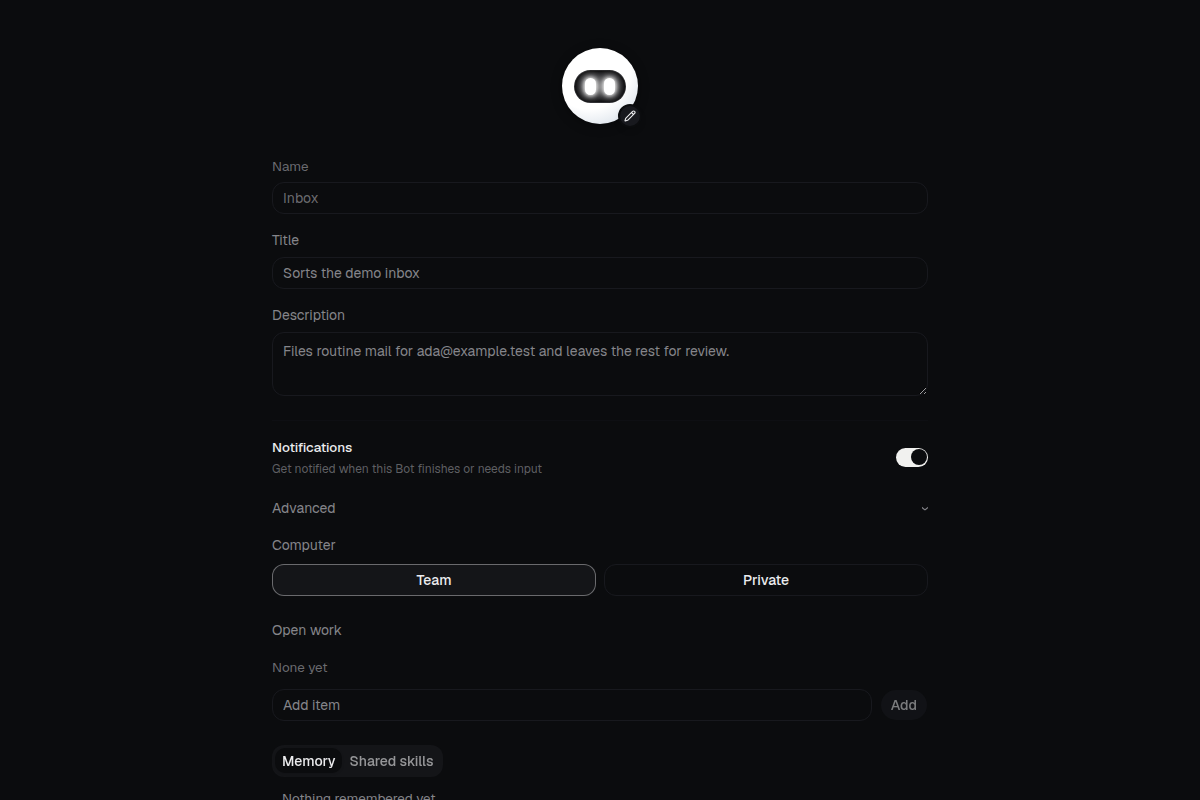
Connector credentials are encrypted on the server and are not returned by the API. Model prompts still leave the machine, because the provider has to see them. If that is unacceptable, point the bot at a local server you run.
Save a routine
Routines are readable Markdown. You can run one on a schedule, from a webhook, or from a message provider you connect. The editor is the place you read and change that text. The shot is a weekday inbox check with a made-up instruction. It does not connect to a mailbox.
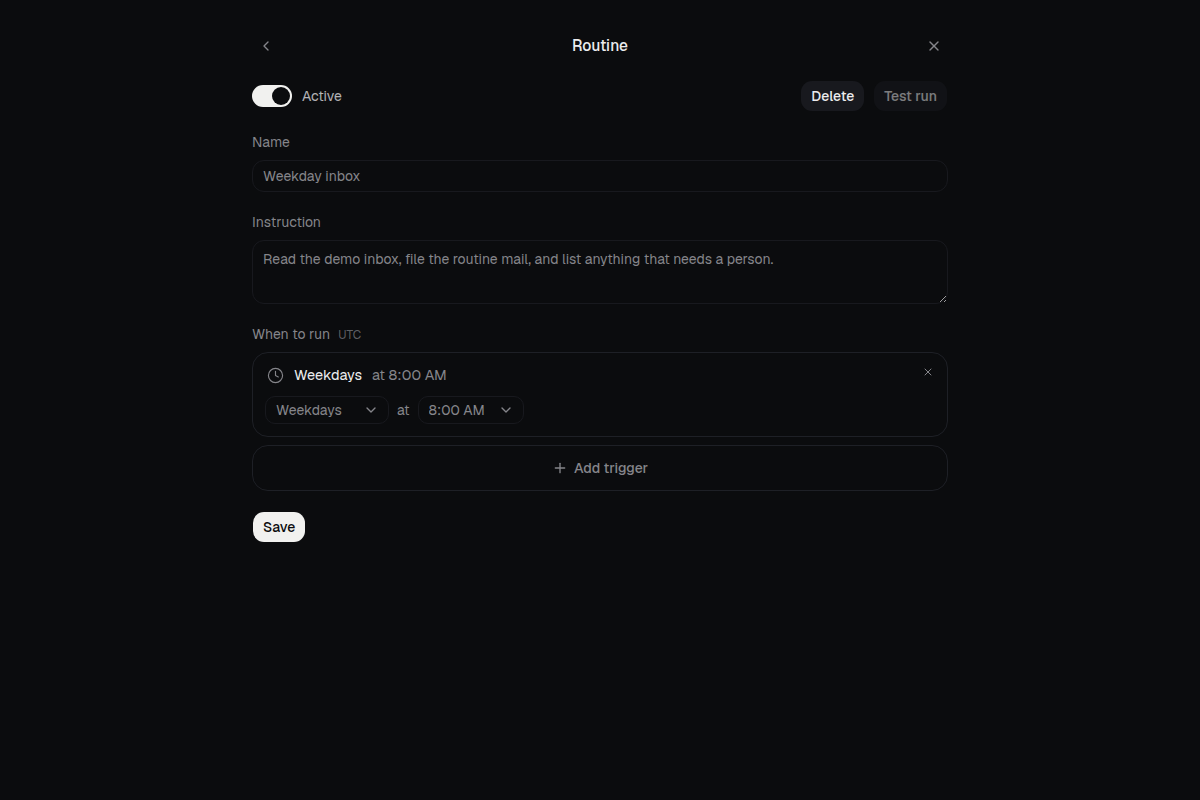
A schedule does not by itself grant new permissions. The bot still stops when work crosses a boundary you set.
Approvals
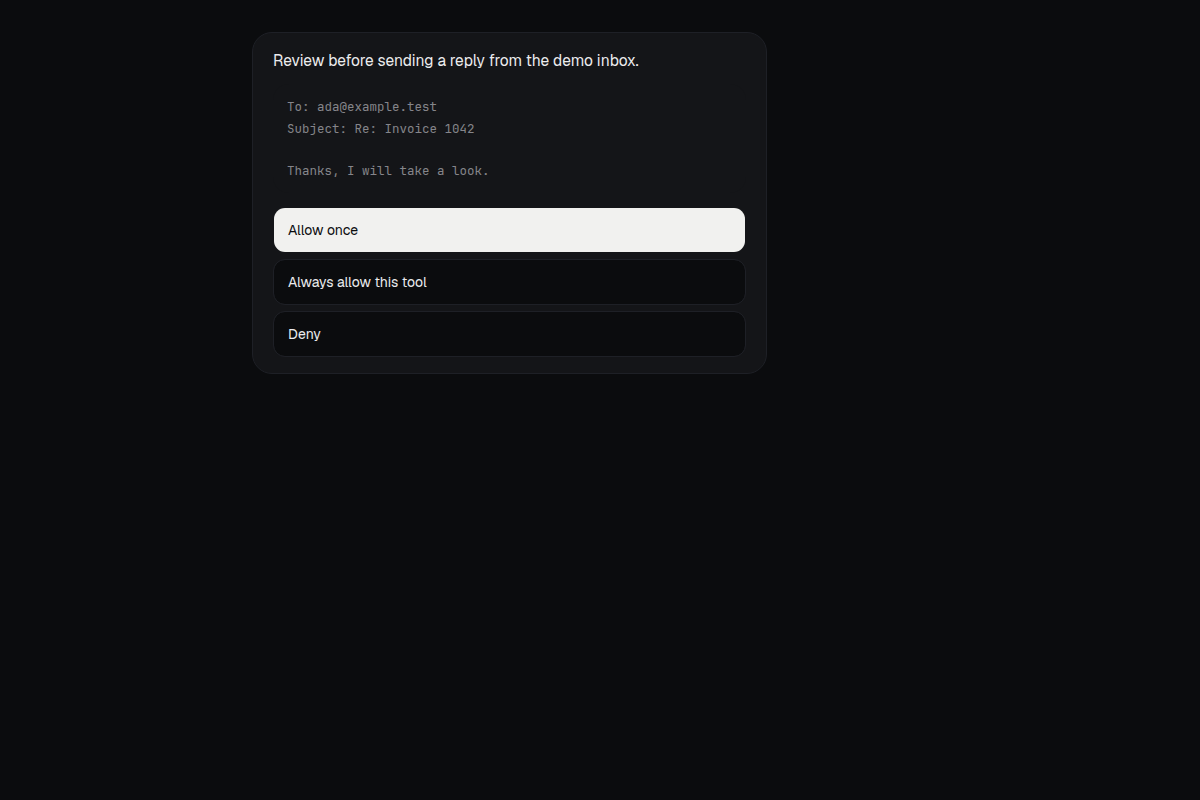
An approval is a card in the thread. The bot states the action, shows the detail, and waits. Allow once, always allow that tool, or deny. The action is recorded in an audit log on the deployment. The card in the figure is a demo reply to ada@example.test. It was not sent.
Optional connectors can attach Slack, WhatsApp, Telegram, iMessage via Sendblue, and Feishu/Lark. They are extras. Chat in the Rakazo apps does not require them.
When the machine is a server
Use the same installer on a VPS when bots should keep running after you close a laptop. Images Compose binds the web app to loopback 127.0.0.1:5173. Terminate TLS on the host and proxy there. Do not publish port 3100. The web server proxies /api.
Set RAKAZO_HOST to the hostname. Set BETTER_AUTH_URL, WEB_ORIGIN, and API_URL to that same https:// origin. For a remote computer instead of local Docker, set SANDBOX_PROVIDER to e2b, daytona, createos, or box and add that provider’s key.
A minimal Caddy site is a reverse proxy to 127.0.0.1:5173. Replace the example host with yours. Desktop clients should use Existing instance with the https:// address. HTTP is accepted only for loopback and private LAN addresses. This computer in the desktop app installs the published images with Docker Compose on that machine, on port 45173 by default so it can sit next to a dev server.
In the mobile app, tap Use a custom server on the sign-in screen and enter the same HTTPS origin as WEB_ORIGIN.
This server path is why a public install is not the same job as the local script. You are choosing a hostname, a TLS terminator, who may sign up, and where secrets live. The secrets checklist names the values and how to recover them. The restricted-network guide covers mirrors when the installer or the image pull is blocked.
Install from source only if you are developing
Clone the repository, copy .env.example to .env, and set POSTGRES_PASSWORD to a URI-safe random value that also appears in DATABASE_URL. Set BETTER_AUTH_SECRET, ENCRYPTION_KEY, and SCREEN_PROXY_SECRET to independent long random values. Docker sandboxes need their own SANDBOX_SUPERVISOR_TOKEN. Keep these in .env, not in git.
For host-side development with Docker Desktop, set SANDBOX_CONTROL_VIA_LOOPBACK=true so the supervisor publishes its control service on a loopback port. Leave that unset when the supervisor runs inside Compose. docker compose down -v deletes Postgres data.
The published images are enough to run Rakazo. The source path is for changing it.
What to skip on the first afternoon
Backups, upgrades, signup allowlists, SMTP, and host hardening are in the full guide because they matter on a server other people can reach. They are not required to see a bot answer on loopback. Read them before you put the deployment on a hostname.
If downloads fail, stop and use the restricted-network guide instead of retrying the same curl. If a secret was committed or pasted into a chat, rotate it from the checklist rather than editing it in place and hoping.
The desktop app’s This computer option is the same published images, started for you. It does not remove the need for Docker. It does not make prompts stay on the machine when you have selected a hosted model.
How this sits next to other agents
OpenClaw and Hermes Agent are also open source and can run on hardware you control. Their install docs describe a gateway or a desktop app and a CLI, plus config files under a home directory. Rakazo’s published-image path is the script above, then chat. The comparison of those three is about that difference in shape, not a race.
If the first chat on loopback is the goal, stay on the published images, create the owner account, and connect one model. If the goal is a public URL, budget time for TLS and the secrets checklist after the installer finishes.
FAQ
Does the installer take ten minutes?
The commands are short. Docker has to pull the app image, the computer image, and Postgres, and that wait depends on the machine and the network. This guide does not report a measured time.
Do I need Node.js for the published images?
No. The published-image path needs Docker Engine 26 or newer, the Compose plugin, curl, and OpenSSL. Node.js is for a source checkout.
Where does the data live?
Postgres, bot files, browser profiles, and the audit log stay on the deployment you run. Prompts you send to a model provider are processed by that provider.
Is hosted Rakazo Cloud required?
No. Hosted Rakazo Cloud is not generally available. Self-hosting is the way to run it.